How Do I Run Meta Ads for My Business in Kenya
This beginner-friendly guide covers meta ads setup, budget tips, targeting, and creating ad copy that converts.

Mumbi Wanjiku
Contributing Writer @ Quorage
To run Meta ads for your business in Kenya, start by setting up a Meta Business account and choose a clear campaign objective. Then define your target audience, set a budget, and create a high-quality ad with a clear message and strong call to action.
Focus on broad targeting so Meta can find the right people for your ad. Use clear images or videos and simple copy that is easy to understand. Let your ads run for a few days before making changes. One of the biggest mistakes to avoid is targeting the wrong audience or changing your ads too quickly, as this leads to low reach, fewer clicks, and no sales.
Meta ads for small businesses help reach more customers and drive sales when used correctly.
Without the right approach, you may waste money, get low sales, and not reach the right audience.
So, I’ve created this beginner-friendly guide to show you exactly how to run Meta ads step by step. I’ll also cover how to write ad copy, best practices, and mistakes to avoid.
Meta ads are paid advertisements you see while scrolling on Facebook, Messenger, Instagram, and other Meta-owned platforms.
Read till the end to learn how to run ads that actually bring results.
But first, check out how meta ads work.
How do meta ads work?
Meta ads work by showing your post to people who are most likely to be interested, based on your targeting. To make this possible, Meta structures your ads into three simple levels: campaign, ad set, and ad.
I’ll break it down below.
The ads are created and managed in Meta Ads Manager, which allows you to track your advertising campaigns in one place.
The Meta ads system matches your business to the right audience. Instead of showing your ad to people who follow your page, Meta lets you target your audience based on factors like:
- location
- Age
- Interests
- Behavior.
E.g., if you own a cake business in Nairobi, your ad will only show to people in Nairobi who are interested in baking, weddings, or birthdays.
When you create an ad, you give the system three important details: your objective, the audience you want to reach, and how much you are willing to spend. Meta uses this information to show your ad to people who are willing to engage with it.
Meta Ads Manager structures your ad in 3 simple levels:
- The first one is the campaign: This is where you decide what you want your ad to achieve. Is it more site visits, engagement with your post, sales, or introducing more people to your business?
- The second one is ad set: This is where you decide who should see your ad based on things like location, age group, interests, daily budget, and where your ad should appear, whether it is Facebook, Instagram, or both.
- The third level is the ad: This is the post people see as they scroll on social media. It can be a photo or a video with a caption and a call to action.
Create ads using bright, clear images and steady videos that showcase your product. Additionally, create engaging content. Use trending music, eye-catching visuals, or attention-grabbing ideas to show why your product matters. Meta is more likely to show engaging ads to more people.
Now that you understand the basics, let’s walk through how to run Meta ads for a small business step by step.
How to run meta ads for a small business in Kenya
To run Meta ads for a small business, follow these simple steps: create your Meta Ads account, choose your campaign objective, define your target audience, set your budget, and then create your ad.
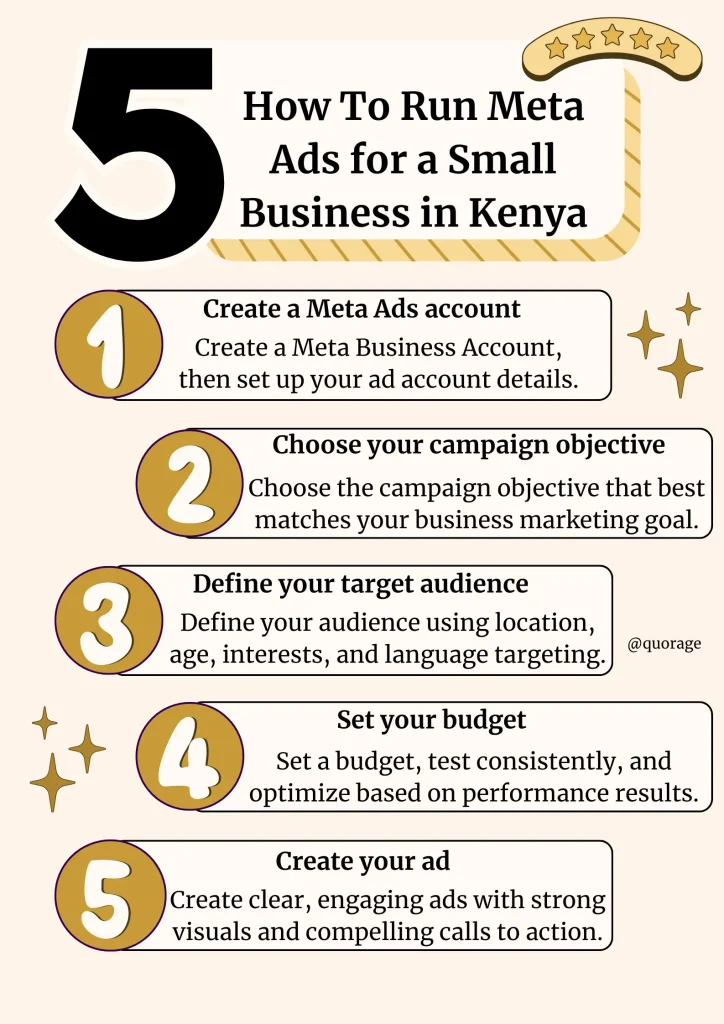
Step 1: Create a Meta Ads account
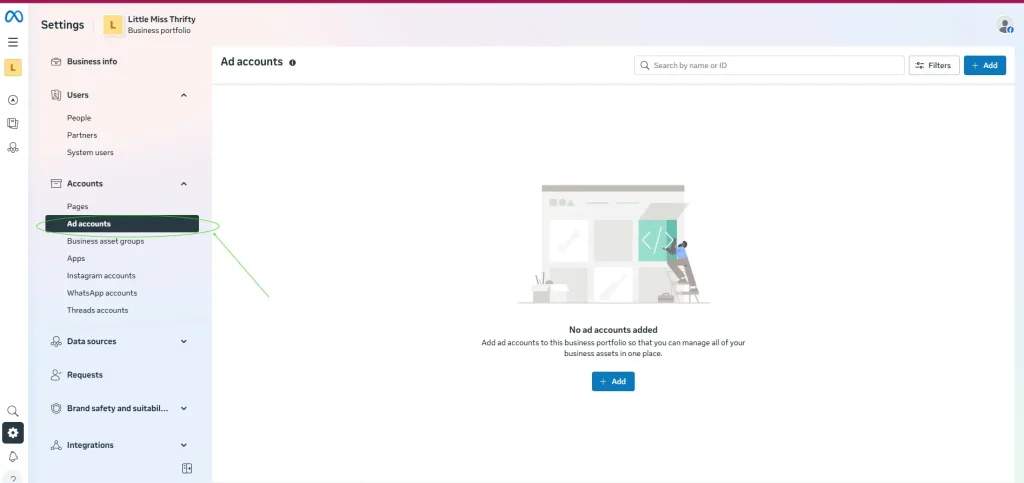
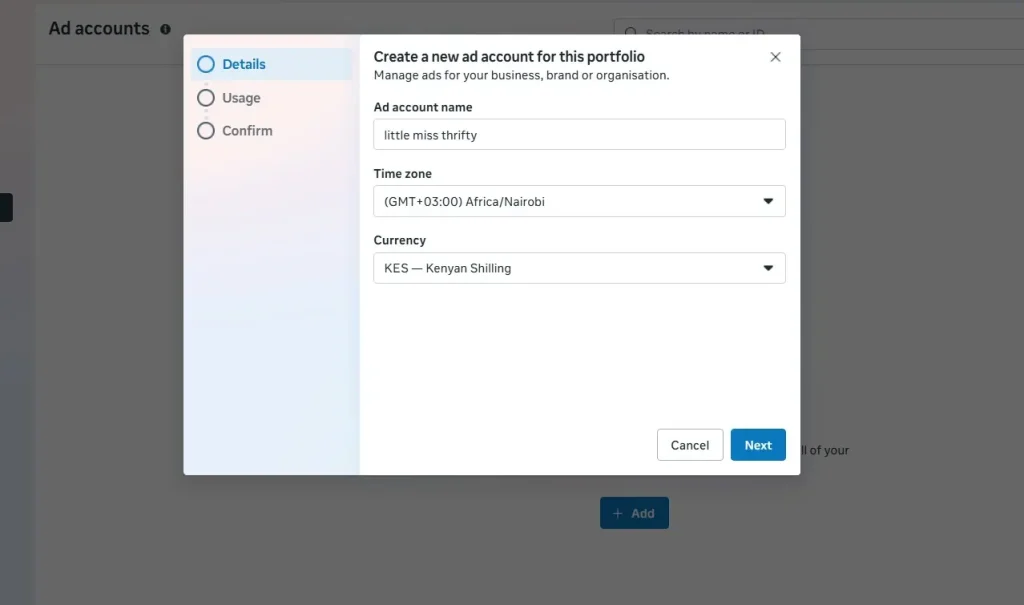
To create a Met ads account, go to business. facebook.com and make sure you are logged in to your personal Facebook profile on the browser that you are using. All you need to create a Meta Business Account is a Facebook account, your business name, your name, and your business email address. Next, create your ad account by going to settings and clicking on ads in the accounts button. Give your account name, timezone, and the currency you prefer to pay for Meta ads in, and you are all set.
- You will start by creating a Meta Business Manager account (also known as Meta Business Portfolio). A Meta Business Manager account is where you’ll manage your Meta ad assets, such as your Facebook, Instagram, WhatsApp, and Ad accounts.
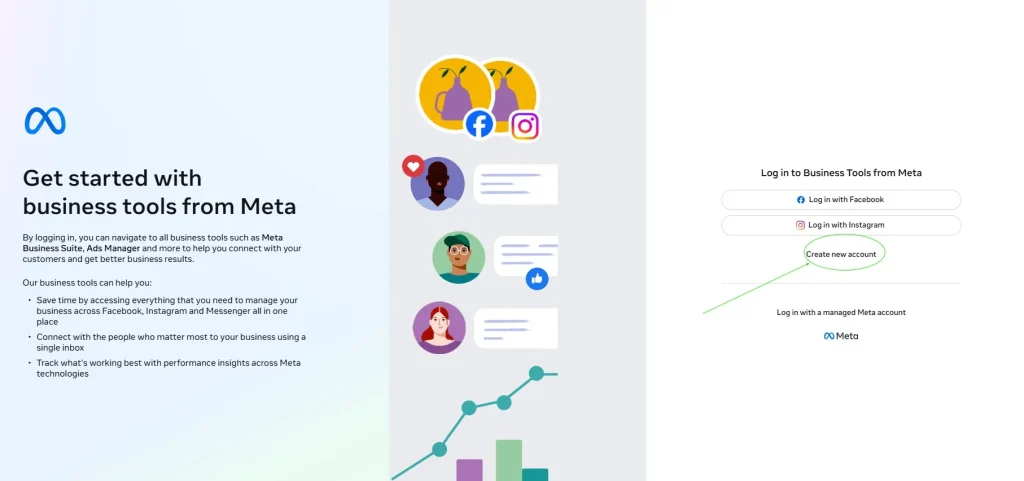
To create an account, head over to business.facebook.com and press create account. ( To set this up, you will need to be logged in to your personal Facebook profile on the browser that you are using.)
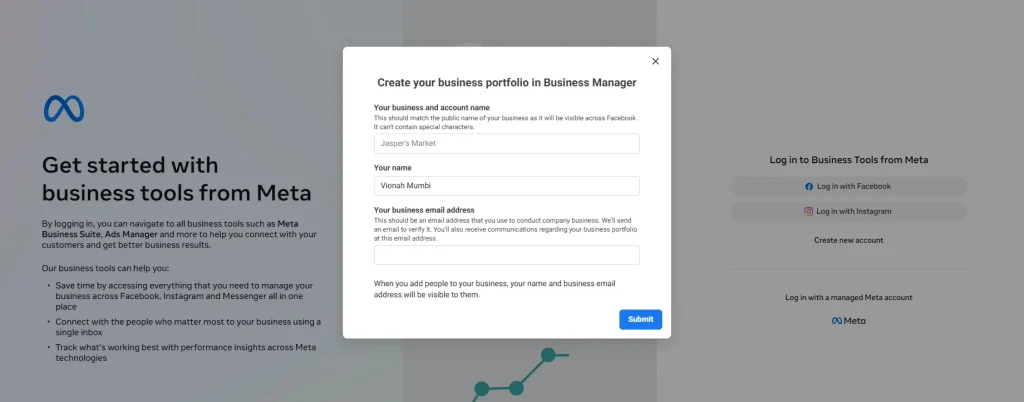
- Next, add your business name, your name, and your business email address, and press submit. Just like that, your Meta Business account is set up and ready to use.
To run actual ads, you will need to connect your Facebook account (and Instagram if you have one)
- To do this, go to settings, then in the accounts section, select pages, then select “add”. You can choose to start with your Facebook or Instagram account and follow the prompts until you are done.
Tip: For Instagram, you will need to connect your business account; if you connect your personal account, it will automatically be converted to a business account.
- Lastly, create your ad account. Go to settings
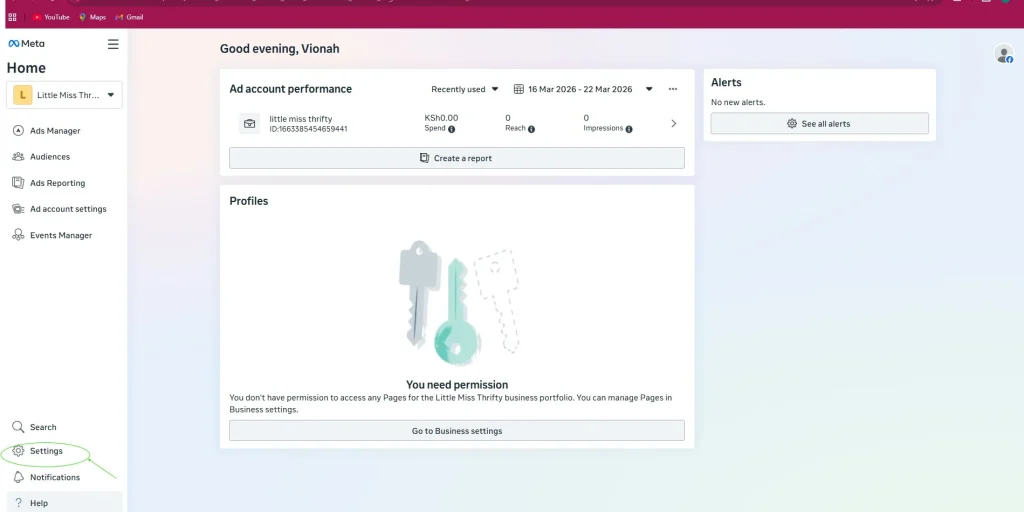
In the Accounts section, click “add.”
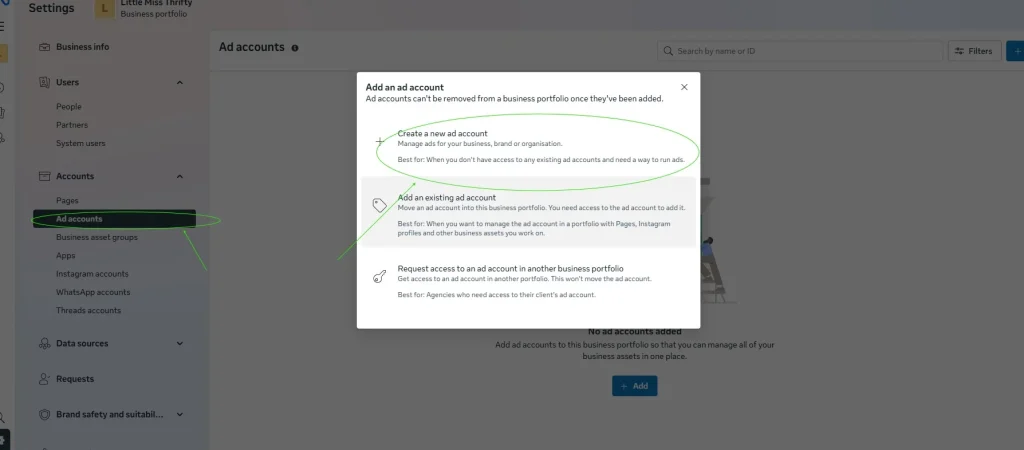
Then select “Ad Account.” A setup section will appear where you’ll enter your account name, choose your timezone, and select the currency you’ll use to pay for your Meta ads.
Then click “Create Ad Account,” and that’s it, you’re all set.
Now that your ad account is all set up, the next step is to choose your campaign objective.
Step 2: Choose your campaign objective
Common objectives include: Awareness (reach more people and introduce your brand). Traffic (drive clicks to your website or landing page). Engagement (encourage likes, comments, and shares). Leads (collect customer information). Sales (drive purchases). App Promotion (increase app installs). Choosing the right objective ensures your ad reaches the right audience and achieves your desired outcome.
Start with a clear objective rather than just boosting an existing post. Campaign objectives help you define what you want to achieve and make it easier to track, measure, and optimize results.
It’s tempting to pick a post you’ve already created and boost it, which can work for quick visibility. However, if you want results you can track, measure, and improve over time, it’s better to create a campaign and choose the right objective from the start.
Here are some objectives you can choose from:
- Awareness: This is useful when you are launching something new or want people to know your business exists. With this objective, the system shows your ad to as many people as possible.
- Traffic: Choose this objective if you want to send people to a specific destination, such as your website, landing page, or online store. The system will show your ad to people who are likely to click your link.
- Engagement: This objective is for when you want likes, comments, shares, and more interaction with your posts. This is a good choice when your goal is to grow your page or create a community around your brand.
- Leads: If your goal is to collect customer information, e.g., email addresses or phone numbers, leads is the right objective. It lets you create simple forms directly in the ad, so people can submit their details without leaving the app.
- Sales: This objective focuses on getting people to buy your product or service. It is commonly used by businesses with online stores that want to track purchases and conversions.
- App promotion: If you have a mobile application and want more people to download it, this objective helps you reach users who are likely to install it.
Choose the objective that best suits your goal. For example, if you want more interaction with your page, choose the “Engagement” objective.
If your goal is to send people to a website or link, choose the “Traffic” objective.
Tip: As a beginner, it is best to start with objectives such as “Engagement” and “Traffic,” as they are easier to track and understand. Once you have tested your ads and learned how Meta Ads work, you can move on to more advanced objectives, such as “Sales,” which require a bit more experience.
Step 3: Define your target audience
To get the best results from your Meta ads, you need to show them to the right people. Start by defining basic factors such as location, age, interests, and language to reach people most likely to be interested in your product or service.
Keep your targeting simple at the beginning. Choose 2–3 relevant interests and pair them with specific demographics, such as people living in Nairobi who fall within your ideal age group. Avoid over-targeting, as this can limit your reach.
As you gain data, you can improve your targeting using tools like lookalike audiences (to reach people similar to your customers), Advantage+ audience (Meta’s AI-powered targeting), and audience exclusions (to avoid wasting budget on irrelevant users).
While targeting is important, your ad creative and message matter even more. Focus on speaking directly to your audience, and let Meta optimize delivery over time.
Once you have chosen your objective, the next step is to define your audience. This is where you decide who will see your ad and focus on reaching the people most likely to be interested in your product or service.
Even the most brilliant ad won’t perform well if it is shown to the wrong people. You can define your audience using several factors, and age, location, and interests are just some of the most common examples:
- Location: Be as specific as possible. For example, if your business is in Nairobi, you can target people within the city or even specific areas like Westlands or Kilimani. This ensures your ad reaches people who can actually access your business.
- Age: Choose an age group most likely to be interested in your product or service. For instance, if you sell trendy fashion items, you might target people aged 20–35.
- Interests: Target people based on what they like or engage with online. For example, a fitness business could target people interested in gym workouts, weight loss, or healthy living. Don’t stack too many interests; 2 to 3 will do.
Tip: Meta also allows targeting based on behaviors, connections, and custom audiences, giving you even more control over who sees your ad.
For beginners with a small budget, it’s best to start simple. Use a broad interest group (like fitness enthusiasts) and narrow it down with basics like age, location, and language.
As you run more ads, you’ll start to see what works. From there, you can test options like lookalike audiences or Advantage+ to improve your results.
Remember, targeting matters, but your creative and ad copy matter even more. Focus on making your ad speak directly to your audience. Meta’s AI will help optimize delivery over time.
You can also refine your audience further using more advanced options:
- Lookalike Audiences: This lets you reach new people similar to your existing customers or followers. For example, if you already have a list of clients or people who engage with your page, Meta can find others with similar behaviors. This is great once you have some data.
- Advantage+ Audience: This is Meta’s AI-driven targeting. Instead of manually selecting detailed interests, you give Meta a general idea of your audience, and it automatically finds the best people to show your ad to. This works especially well when you have strong creatives.
- Exclude Audiences: You can remove people who are not relevant. For example, if you are targeting new customers, you might exclude people who have already bought from you. This helps avoid wasting your budget.
- Language: You can also choose the language your audience uses. This is useful in Kenya, where people may prefer English, Swahili, or a mix of both. Match your ad language with your audience for better results.
With your audience defined, the next step is to decide how much to spend. Your budget will determine how many people see your ad and how quickly you can test what works.
Step 4: Set your budget
Meta Ads lets you start small and test efficiently. A daily budget of KES 300–1000 allows performance testing without overspending. Run ads for 5–7 days to give Meta time to optimize delivery, test one audience at a time, and pause underperforming ads. Experimenting this way helps you use your budget efficiently and maximize results.
One of the biggest advantages of Meta Ads is that you can start small. For instance, a daily budget of KES 300–1000 allows you to test your ads’ performance without overspending.
For the best results, run your ads for at least 5–7 days so Meta has enough time to learn and optimize delivery. It also helps to test one audience at a time and pause ads that aren’t performing well. By experimenting and observing what works, you’ll learn how to use your budget efficiently and get the most out of your ads.
Step 5: Create your ad
Your ad is what people actually see, so keep it simple, clear, and attention-grabbing. Use bright and clear images or short videos that feel like everyday social media content, not overly polished ads.
A good ad includes a clear visual, a simple caption that highlights the benefit, and a strong call to action, such as “Shop Now” or “Send Message,” to make it easy for people to take the next step. Focus on clarity over complexity. The goal is to grab attention quickly and make it easy for people to take the next step.
Once you’ve set your audience and placements, it’s time to create the ad itself. This is what people will actually see. Your ad needs to capture attention quickly and evoke emotions, so keep it simple and clear. Instead of extreme branding, lean on natural images or videos that are similar to the typical user-generated content you find on social media.
A typical Meta ad usually includes an image or short video, a headline, a caption, and a call to action. Choose a clear product photo or a short video that shows your product or service in action, like a before-and-after illustration. Then write a simple caption that explains the benefit and add a call to action, like “Shop Now,” “Send Message,” or “Learn More.”
Remember, straightforward ads often perform better than complicated ones, especially when you’re just starting out. The goal is to grab attention and make it easy for people to take the next step.
Once your ad is set up, the next step is to write an ad copy that speaks directly to your target audience and encourages people to take action.
How to write ad copy for your meta ads
Writing effective Meta ad copy begins with understanding your target audience: their age, location, interests, challenges, and the solutions they seek. A strong ad communicates a clear message, highlights benefits, grabs attention with a hook, and directs the audience with a precise call to action (CTA). Test multiple copy variations helps identify what resonates most with your audience and ensures consistency between the ad and landing page.
The most important thing when writing ad copy is to speak directly to your target audience. Start by being super clear on who you’re targeting (age, gender, income, location, interests, language they speak, problems they’re facing, and the type of solution they’re looking for). This will guide you when choosing your hook, benefits, call to action, and even the image/video to use.
When you run meta ads for a small business in Kenya, an effective ad copy can be the difference between an ad that converts and one that gets ignored.
An ad copy is the text in your ad that communicates your message to potential customers. It tells them what you offer, why it matters, and what action to take.
Below are the best practices for writing a Meta Ad Copy;
Best practices for Meta Ad Copy
- Start with a strong hook – Kenyans are fast scrollers, so you need to grab their attention immediately. You can use a question, bold statements, or relatable problems as your hook.
- Focus on benefits – explain how your product or service improves your customer’s life. E.g., Instead of saying “Our blender has 1000 watts of power,” say “make smoothies in 30 seconds.”
- Keep your message clear and concise – Use short sentences and clear words so as not to lose the fast-scrolling audience.
- Include a clear call to action (CTA) – Direct your audience with instructions like “send us a message or shop now.”
- Test different versions – Experiment with hooks, benefits, and CTAs to find what drives the most engagement.
Meta allows you up to 5 different copy variations for each advert. This allows you to test out different messaging and learn what works best with your audience.
A replicable Meta ad copy template
There is no single formula for writing ad copy. The best Meta ad for a small business in Kenya depends on your product, audience, and goal. However, here are a few structures you can use:
Formula 1
Hook – Problem/ relatable situation – solution/benefit – social proof – call to action (best for service-based ads)
Example
- Hook: Can’t get enough hours in a day?
- Problem: Managing multiple tasks is overwhelming
- Solution/benefit: Organize your day to focus on what matters most with our productivity planner
- Social proof: Join 10,000+ busy professionals who have boosted their productivity
- CTA: Get your planner now
Tip: What you’re writing in your ad should connect with where the ad takes the user. Make sure the ad content is consistent with the landing page (or product page, depending on where the CTA button takes the user).
Formula 2
Hook – Use cases (where it fits in your daily life) – Feature – CTA (best for e- commerce ads)
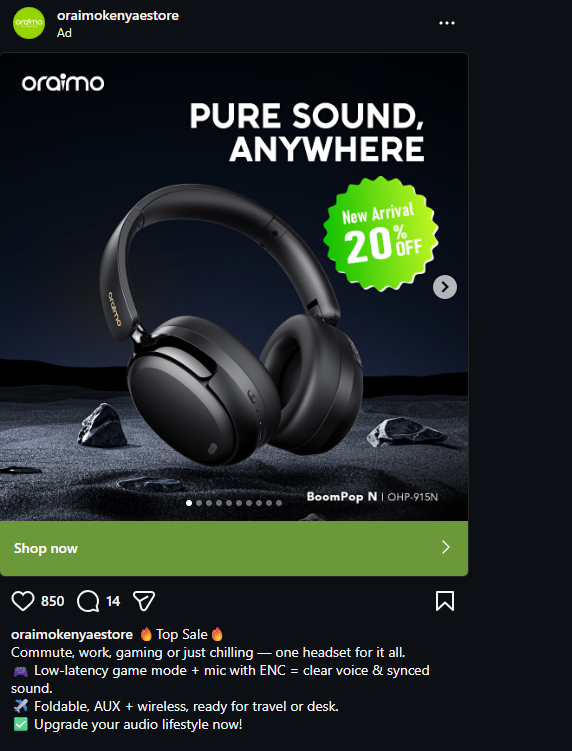
- Hook – Top sale
- Use cases (where it fits in daily life): commute, work, gaming, or just chilling- one headset for it all
- Feature: Low-latency game mode + mic with ENC = clear voice & synced sound.”
Foldable, AUX + wireless, ready for travel or desk. - CTA: Upgrade your audio lifestyle now!
Mistakes to avoid when running meta ads
Some common mistakes to avoid when running Meta ads include: targeting everyone, running ads for a short time, poor-quality images or videos, too much text on visuals, confusing ad copy, lacking a clear goal, and breaking Meta advertising policies.
To run better ads and avoid losing money, here are some common mistakes to watch out for:
- Targeting everyone: A lot of business owners advertising on Meta make the mistake of showing their ad to everyone. Take time to understand your target audience. Ask yourself who they are? Where do they live? How old are they? Are they men, women, or both? And what platform do they commonly use? Is it Instagram or Facebook? Look at your past customers or your competitor’s customers if you’re new in business. The better you understand your audience, the easier it is to create ads that speak directly to them.
- Using big, confusing words in your ad copy: Most people scroll quickly, so if your message is confusing or feels like too much work to read, they will just skip it. Your ad will not get attention, messages, or sales. Instead, use simple, everyday words that anyone can understand. Advertise using words that your customers use every day.
- Not having a clear goal: When you set too many goals for your ad, the system gets confused. It doesn’t know whether to show your ad to people likely to click your website, message you, or buy your product. As a result, your ad costs more, performs poorly, and reaches a few of the right people. Pick one objective for your ad, e.g., engagement. Meta will show your ad to people most likely to take this action.
- Ignoring budget: Stay within the budget you set, even when your ad is not performing. Start small, spending KES 300 -500 per day. Instead of increasing your budget, test different images, words, and audiences to see what works. When you find a version that works, slowly increase your budget.
- Using poor-quality images or videos: Dull, blurry, or heavily edited/unreal-looking images and videos don’t do well on social media. Use high-quality, natural-looking images and videos. A good looking ad can get more attention even if you spend little money.
- Not testing different ads: The secret to running successful ads is A/B testing. Try different images or videos, change headlines or descriptions regularly, and test your ad on different audiences. This way, you’ll quickly see which version people like best and spend your money on that
- Forgetting to add a call-to-action (CTA): Even a good ad won’t work if people don’t know what to do next. Always include a clear instruction like “call now,” “Visit our shop today or send us a WhatsApp message on 07 xx xxx xxx.”
- Posting content against Meta rules (Policy violations): When you post an ad that violates Meta’s rules, it may be rejected, or your account may be restricted. Avoid false promises, unrealistic “before-and-after” pictures, or the sale of restricted items. Keep your ads honest and clear. Also, always check Meta advertising policies before publishing your ad.
- Taking too long before replying to messages: Kenyans online will buy from whoever replies first. Make sure you reply to any messages or comments within an hour.
Now that you understand how to run Meta Ads and avoid common mistakes, let’s look at some frequently asked questions about Meta Ads.
FAQs
Are Meta Ads expensive?
No, meta ads are not expensive. Small businesses can start ad campaigns with a budget as low as ksh 300 or 500 per day.
It is recommended to start with a small budget, test your ads, and then increase your spending once you see results.
Does Meta decide how much I spend on Ads?
No. Meta does not decide how much you should spend on ads. You decide your budget.
What Meta does is decide how far your budget goes, how many people will see your ad, and how expensive your results are ( this is how much you pay to get one result from your ad, e.g., one message, one click, one sale, or one lead).
What determines my Meta Ads budget and performance?
When running Meta Ads, the following factors determine your budget and performance:
- Your audience size and competition. If many businesses are targeting the same audience, your ad becomes too expensive. In the beginning, start with a broader audience; this gives Meta more people to show your ad to, and this reduces your cost.
- Your ad quality. Meta favors ads that people engage with. If your ad gets clicks, likes, or messages, Meta will show it to more people at a lower cost. Create captivating content and use simple messaging and a clear call to action to encourage engagement.
- Your campaign objective. Different objectives cost different amounts. E.g., Someone looking to get more sales will pay more than someone looking for engagement.
As a beginner, start with engagement and traffic, then move to sales when you understand your audience.
- Your bidding and budget settings. Meta uses an auction system to decide which ad to show. Your budget and bid influence how your ad appears. Set a daily budget you are comfortable with (Ksh300- Ksh1000) and let Meta optimize delivery automatically.
- Your consistency. Running ads for a short time or changing them too often can increase your costs. Run your ad for at least 5-7 days before making any changes.
How long should I run my Meta Ads?
You should run your Meta ads for 3 to 7 days. Most ads perform better after a few days because Meta needs time to understand your audience.
Should I boost posts or use Ads Manager?
Ads Manager is better than boosting posts because it gives you more control over targeting, budgeting, and performance tracking.
How do I know if my Meta Ad is working?
To know if your Meta ad is working, check important metrics such as link clicks, messages received, sales, or inquiries. If people are clicking or messaging you, your ad is working.
Over to you
Meta Ads can be a powerful marketing tool for small businesses in Kenya. With the right targeting, a realistic budget, and clear ad copy, even beginners can reach new customers and grow their business.
The key is to start small, test different strategies, and learn from the results. Over time, you will understand what works best for your audience and how to create ads that bring real results.
