How to Attract Customers Online Without Relying on Ads
Check out how 3 businesses attract customers consistently without paid advertising.

Mumbi Wanjiku
Contributing Writer @ Quorage

Attract new customers by improving your online visibility using Local SEO and posting helpful content, and encourage repeat purchases using email marketing.
This guide breaks down the details of these budget-friendly strategies for getting customers online, including Local SEO, content marketing, and email marketing. We use real-life case studies to demonstrate how each strategy works and how you can apply it to your own business.
You’ll see how to use Local SEO to get discovered by nearby customers. Additionally, you’ll see how content marketing builds trust by answering customers’ questions, and how email marketing encourages customers to come back and buy again.
Read on if you’re a small business owner looking to consistently attract new customers and increase sales without overspending on marketing.
Here we go.
1. Use local SEO (Search Engine Optimization) strategies
To get found through local SEO, first complete your business information on Google Business Profile and Bing Places for Business. Use phrases (keywords) that people actually use to describe your products or services. Then get your business Name Address and Phone number listed on local directories like Yellow pages. Finally, encourage your customers to leave a review on Google and post relevant updates on your profile.
Local SEO is the process of giving search engines more information about your business/brand so that your business appears when people near you search for the products or services you offer on Google/Bing or Google Maps/Bing Places for Business. The goal is to make it easier for local customers to find, contact, and visit your business location.
For example, if you own a salon in Nairobi and someone searches for “hair salon near me” or “best hair salon in Nairobi,” local SEO helps your business appear in those search results.
Here’s how a Chicago restaurant used local SEO to attract more customers.
Chicago Restaurant case study
An Italian restaurant in Chicago’s Lincoln Park neighborhood was struggling to appear in Google’s local search results. They had 4.2 stars and 140 reviews. However, they were ranked around positions 8 to 15 on Google Maps and were not appearing in the Local Pack for searches such as “Italian restaurant Lincoln Park” and “dinner near me.”
Within just 90 days of optimizing their Google Business Profile (GBP), the restaurant got more phone calls, direction requests, website visits, and customer reviews.
How they did it:
They did a local SEO audit which found three problems that were affecting its visibility.
- First, the restaurant’s primary Google Business Profile category was listed as “Restaurant” instead of the more specific “Italian Restaurant.”
- Second, its menu section was empty, meaning Google had less information about the food and services it offered.
- Finally, the restaurant’s business name was not consistent across platforms, as Yelp included “LLC” while Google Maps did not.
What they did:
- Chose the most relevant business category
- Completed the profile information
- Maintained consistent business information (Name, Address and Phone number) across the web
- Optimized the website for local search phrases like “Italian restaurant Lincoln Park”
- Encouraged more customer reviews
In the sections below, I share further details on the steps they took.
Strategies the restaurant used
The restaurant improved its local search rankings by helping Google better understand and trust its business. They updated the business category, completed the menu, corrected inconsistent business information, used proper schema markup in their website, and encouraged customer to share reviews. These changes increased visibility in Google Maps in the first 90 days and made it easier for potential customers to find and choose the restaurant.
Step 1: Changed their primary business category to “Italian Restaurant” and added “Pizza Restaurant” and “Wine bar” as secondary categories.
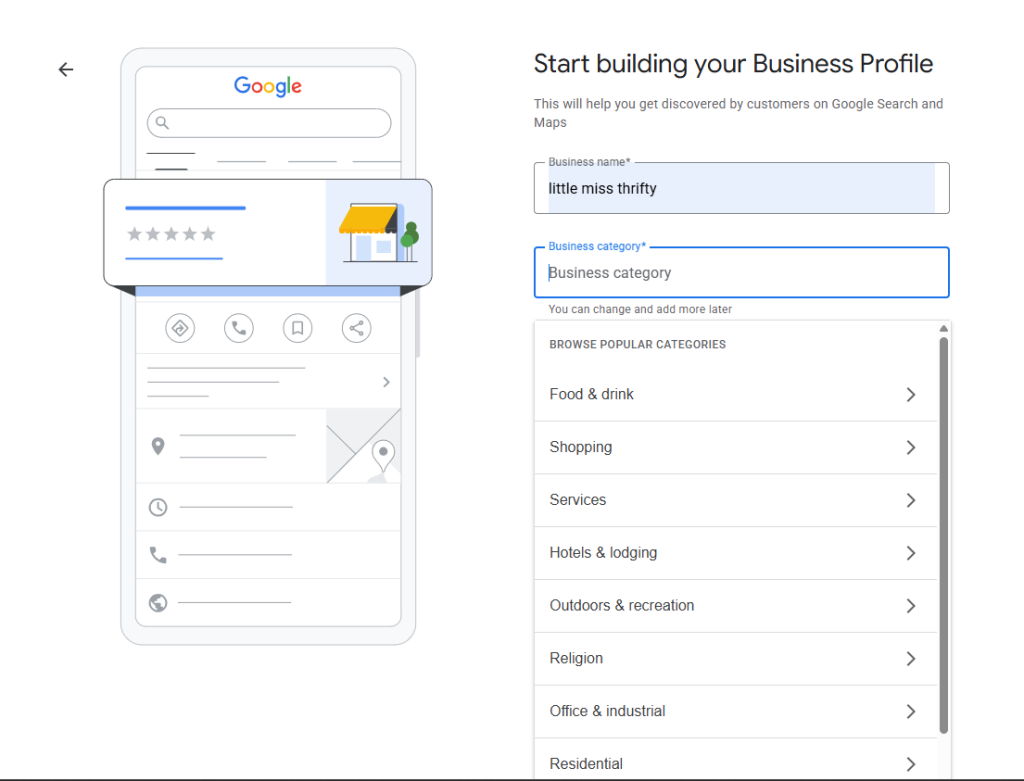
A super-specific business category tells Google what your business is mainly about.
For example, for the Chicago restaurant, choosing “Italian Restaurant” as their primary category helped Google understand exactly what they offer.
Using the right category will therefore help you reach the people who are most likely to need your products or services.
If you’re not sure which category to use for your business, look at your competitors to see what categories they’re using. Just google the category you’re thinking of, see what results come up.
Step 2: They added a full menu with dish names, descriptions, and prices: A complete menu with dish names, descriptions, and prices gives Google a better understanding of the food the restaurant offers, making it easier to match the business with relevant local searches. It also helps potential customers browse the menu before visiting, giving them more confidence to choose the restaurant.
Step 3: Corrected the business name, address and phone number inconsistency across online directories: Consistency whenever your business is mentioned on directories like Yelp and YellowPages helps Google verify that all the information refers to the same business. This builds trust in the accuracy of the business’s information and strengthens its local search visibility. If your business is not listed in local directories, here are 30+ Kenyan directories to submit your business information.
Step 4: Added Schema markup in website pages: Adding schema markup to the website gives Google structured information about the business, such as its location, opening hours, and services. This helps search engines better understand the website and strengthens the connection between it and the Google Business Profile, supporting better local search visibility.
Adding schema markup is a more advanced Local SEO technique, so you don’t need to implement it right away. Focus on the basics first, and as your skills or budget grow, you can add it yourself or outsource it to a professional.
Step 5: Put a table tent (a small sign/card on the restaurant table or counter asking customers to leave a review) and trained the staff to remind customers about it as they pay: This encourages more customers to share their experiences online. A steady flow of genuine reviews improves the business’s credibility and signals to Google that it is active and trusted, which can strengthen its local search visibility.
Within 90 days, the restaurant’s Google Maps ranking improved from position 12 to position 2 for “Italian restaurant Lincoln Park,” while direction requests increased by 312%, phone calls by 184%, website clicks by 89%, and customer reviews grew from 140 to 218: a 56% increase.
How to use Local SEO for your business
Start by optimizing your Google Business Profile, keeping your business information consistent across the web, collecting and responding to customer reviews, aligning your website with your Google Business Profile, using location-based keywords, and building mentions on trusted local websites. These steps help Google better understand, trust, and recommend your business to people searching for the products or services you offer.
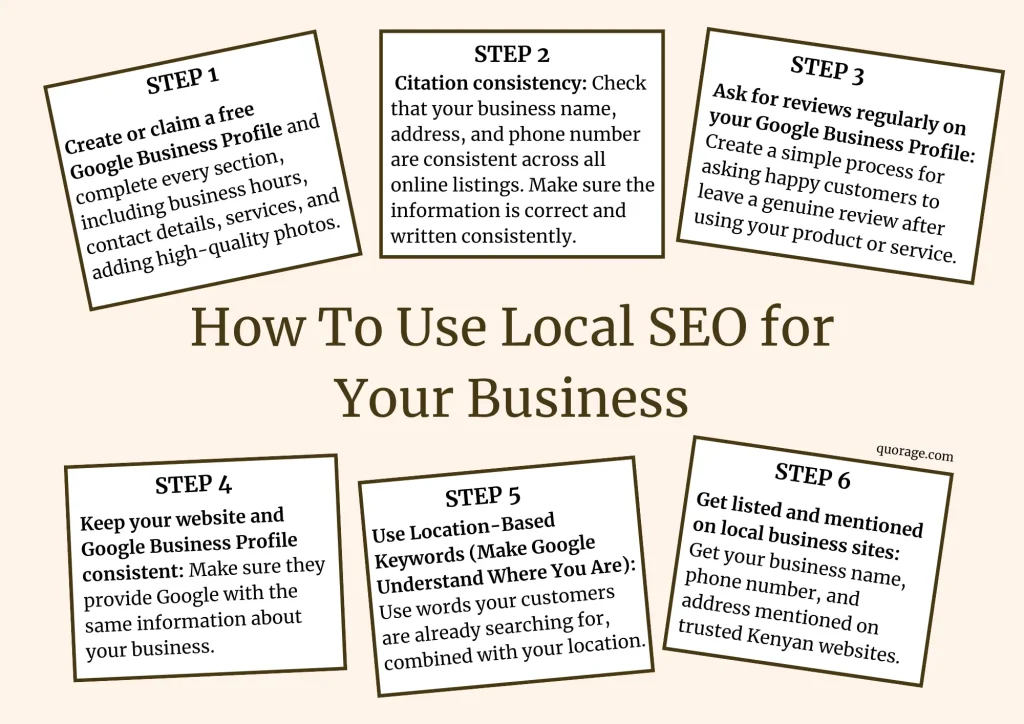
Step 1: Create or claim a free Google Business Profile and complete every section, including business hours, contact details, services, and adding high-quality photos.
Create and set up a Google Business Profile. It will take approximately 20 minutes to 1 hour.
To get the best results:
- Make sure your profile is complete: Fill in all the important information, including opening and closing hours, contact information ( that is, the business phone number or email address), your address, the products and services you offer, and a link to your business website (If you have one), clear images of your business and a description that tells Google more about your business.
- Category specificity: Choose the most specific primary category that accurately describes your business. For example: for the Chicago Restaurant, they chose the category “Italian Restaurant” instead of the general category “Restaurant,” and this is one of the strategies that helped them rank higher on Google Maps.
- Complete services: Make sure to list every service that your business provides.
- Active photo library: Regularly add up-to-date photos of your business, employees, location, and the products and services you sell.
Step 2: Citations (online mentions) consistency: Check that your business name, address, and phone number are consistent across all online directories and social media platforms. Make sure the information is correct and update as needed.
For your example, if you have listed your business on Google Business Profile as:
Name: Shawarma Street
Location: Ronald Ngara Street, City Center Building, First floor
Phone number: 0733800000
That information should appear the same way in all your social media platforms, website, and any directories your business appears in. For instance, writing “street” on some websites and abbreviating the word to “St” would create an inconsistency, and that’s what we want to avoid.
Google uses information from different websites to understand and trust a business. If your business name, address, or phone number differs across websites, Google will become less confident in the accuracy of the information. This will make it harder for your business to appear in local search results.
Step 3: Ask for reviews regularly on your Google Business Profile: Create a simple process for asking happy customers to leave a genuine review after using your product or service. For example, ask them at checkout, send a short message after their purchase, or place a review link on the receipt. Make asking for reviews a regular part of your customer service to keep getting fresh reviews over time.
Google sees active, well-reviewed businesses as more relevant and is more likely to show them higher in local search results.
Additionally, reply to all reviews, both positive and negative, regularly. Thank customers who leave positive feedback, and when someone has a complaint, acknowledge the issue and explain what you are doing to fix it. This shows customers that you are listening and that you care about their experience.
Step 4: Keep your website and Google Business Profile information consistent: Make sure they provide Google with the same information about your business. Your business name, address, phone number, opening hours, and services should match across both.
Google needs to understand who you are, what you offer, and where you are located. When your website and Google profile provide the same information, Google will trust your business matches it with people searching for your services locally
Step 5: Use location-based keywords to help Google understand where you are: Use words your customers are already searching for, combined with your location. Instead of only saying “Italian restaurant,” you should naturally include phrases like “Italian restaurant in Nairobi” or “Italian restaurant in Westlands” on your website, Google Business Profile, Social Media, and listing sites.
Add your location in your homepage headline so that visitors and search engines immediately understand where your business is based, for example “Best Italian Restaurant in Westlands.” You should also naturally mention your area in your service descriptions so it feels organic and reinforces your local relevance.
Additionally, create a simple “Contact Us” page that clearly states your location, making it easy for customers to confirm where you are based and how to reach you. Finally, avoid using too many keywords. Write naturally, reflecting how real people would search for your business.
Step 6: Get listed and mentioned on local business sites: Get your business name, phone number, and address mentioned on trusted Kenyan websites.
To do this:
- List your business on business listing sites. Follow this link to see some of the best directories to list your business as a Kenyan business owner.
- Collaborate with complementary businesses. For example, if you own a boutique, you can partner with a shoe shop, cross-promote on social media, and mention each other on your respective websites and social media pages.
- Ask local blogs such as Tuko to mention your business. Additionally, join and get your business name mentioned on community pages such as active community Facebook groups in the area where your business operates, as well as on WhatsApp and Telegram groups.
Make sure each listing uses the same NAP (Name, address, phone number). Consistency is crucial. When Google sees your business mentioned in multiple trusted local places, it builds confidence that your business is legitimate and relevant to that location, which improves your local rankings.
Finally, Local SEO works best when every step is completed. Use the checklist below to keep track of your progress and make sure you don’t leave anything out.
Recommended tools
Free tools like Google Business Profile, Google Search Console, Google Business Profile Insights, and Canva will provide you with everything you need to optimize your online presence, monitor your performance, and make your business more visible to local customers.
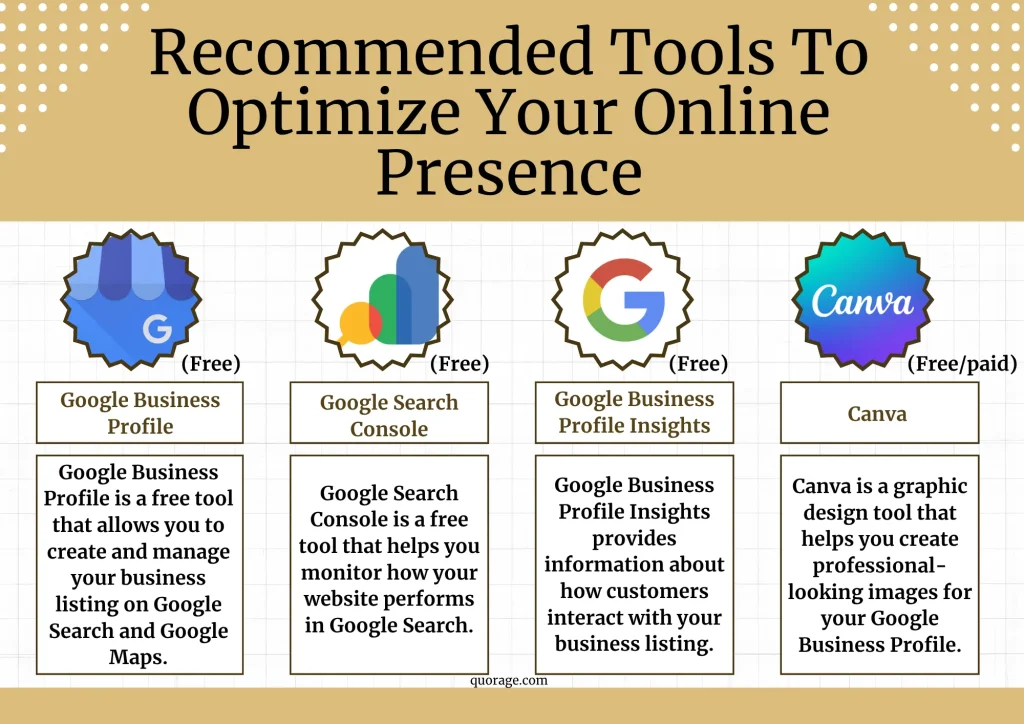
Google Business Profile (free)
Google Business Profile is a free tool that allows you to create and manage your business listing on Google Search and Google Maps. It helps Google understand what your business offers, where it is located, and your contact information. Use it to update your business information, add photos, list your products or services, respond to customer reviews, and share business updates. Keeping your profile complete and up to date improves your chances of appearing in local search results.
Google Search Console (free)
Google Search Console is a free tool that helps you monitor how your website performs in Google Search. It shows you which search terms people use to find your website, how often your pages appear in search results, how many people click on them, and whether Google can access and index your pages correctly. It is important because it helps you identify and fix problems that may prevent your website from appearing in search results.
Google Business Profile Insights(free)
Google Business Profile Insights is a feature built into your Google Business Profile. It provides information about how customers interact with your business listing. For example, you will see how many people viewed your profile, clicked on your website, requested directions, or called your business directly from Google. This information helps you understand which parts of your profile are working well and where you need to make improvements.
Canva (free plan available, with optional paid plans)
Canva is an easy-to-use graphic design tool that helps you create professional-looking images for your Google Business Profile and other marketing channels. Use it to design cover images, promotional graphics, event announcements, and social media posts without needing design experience. High-quality images make your business profile more attractive, and help build trust with potential customers.
Estimated timeline
During the first two weeks, Google processes your profile updates and indexes any changes to your website. For weeks three and four, you notice improvements in your Google Maps visibility and profile interactions. By the second and third month, you should start seeing more phone calls, website visits, direction requests, and stronger local rankings. To maintain and continue improving these results, you’ll need to keep your profile active by regularly updating it, adding photos, and collecting customer reviews.
Expect to see Local SEO results in stages:
Week 1 and 2
Google processes your profile updates, verifies new information, and begins indexing any website changes.
Week 3 and 4
You start seeing small improvements in Google Maps visibility, profile views, and customer interactions, especially if you fixed major issues like incorrect categories or inconsistent business information.
Month 2
You will notice more phone calls, website visits, direction requests, and an increase in local search visibility.
Month 3
If you have consistently optimized your profile, collected new reviews, replied to customer feedback, and kept your information accurate, you will see noticeable improvements in local rankings and customer inquiries. This is also when many businesses begin appearing more often in the Local Pack.
Beyond 3 months
Continue updating your profile, adding photos, collecting reviews, and creating local content. Local SEO is an ongoing process, and businesses that stay active usually maintain and continue improving their visibility over time.
Once your business is easier to find through Local SEO, the next step is giving potential customers a reason to choose you. This is where content marketing comes in. By consistently creating valuable content that answers your audience’s questions and solves their problems, you build trust, establish credibility, and attract customers.
2. Use content marketing to build trust
Content marketing helps small businesses attract and retain customers by consistently creating valuable content that educates, solves problems, and builds trust. Make sure to understand your audience, create content for every stage of the buyer’s journey, organize your content around key themes, and measure your results. You can build a sustainable source of organic traffic and long-term customer growth without relying heavily on paid advertising.
Content marketing is the process of creating and sharing valuable, relevant content that helps potential customers solve problems, answer questions, and make informed buying decisions. By consistently publishing content that addresses your audience’s needs, you build trust and establish credibility. As your audience continues to find value in your content, they become more likely to choose your business when they are ready to make a purchase.
Beardbrand, a men’s grooming company, used content marketing as a new business with a very small marketing budget to get new customers. Here’s how they did it:
Beardbrand case study
Beardbrand is a men’s grooming company that sells beard, hair, and body care products. Before selling its own products, the company focused on educating men through content that answered their questions about growing, maintaining, and styling beards. As its audience grew, Beardbrand turned that trust into customers and built a business that now generates over $100,000 in monthly recurring revenue. This case study shows how valuable content can attract potential customers and drive business growth.
When Beardbrand entered the men’s grooming industry, it faced a major challenge: it had no established audience and operated in a market where many people still viewed beards as unprofessional. The company also recognized that men had limited access to reliable information on how to grow and care for their beards.
Beardbrand used content marketing to educate its target audience and build a community around its brand. By answering the questions men were already asking, the company built trust, grew a loyal following, and eventually turned that audience into paying customers.

Strategies Beardbrand used
Beardbrand attracted customers by educating its target audience before selling to them. The company built trust through valuable content, a focused niche, consistent educational videos, and a loyal community before introducing its products. This approach turned an engaged audience into paying customers and helped drive the company’s growth.
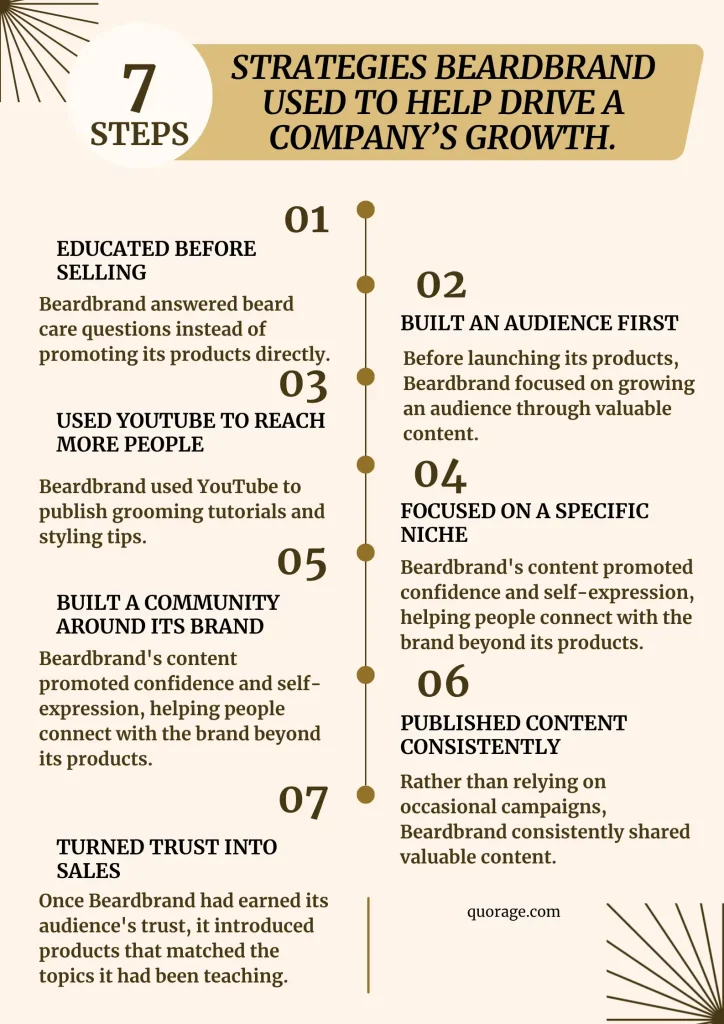
Beardbrand focused on creating educational content that answered common questions about beard care, grooming, and styling.
Here are some strategies they used:
Step 1: Educated potential customers before selling: Beardbrand created educational content that answered common questions about growing, maintaining, and styling beards instead of promoting its products. By solving its audience’s problems first, the company built trust and positioned itself as an authority in men’s grooming.
Step 2: Build an audience first: Before launching its products, Beardbrand focused on growing an audience through valuable content. This gave the company a community that already trusted its expertise when it was ready to sell.
Step 3: Used YouTube to reach more people: Beardbrand used YouTube to publish grooming tutorials and styling tips. These videos attracted new viewers organically and continued bringing in potential customers long after they were published.
Step 4: Focused on a specific niche: Instead of targeting all men, Beardbrand focused on men who wanted to grow and care for their beards. This helped the company create content that directly addressed its audience’s interests and needs.
Step 5. Built a community around its brand: Beardbrand’s content promoted confidence and self-expression, helping people connect with the brand beyond its products. This strengthened customer loyalty and encouraged long-term engagement.
Step 6. Published content consistently: Rather than relying on occasional campaigns, Beardbrand consistently shared valuable content. This kept its audience engaged, attracted new potential customers, and reinforced its credibility.
Step 7. Turned trust into sales: Once Beardbrand had earned its audience’s trust, it introduced products that matched the topics it had been teaching. This made it easier to convert engaged followers into paying customers.
After building an audience of blog readers and YouTube subscribers, the company leveraged that trust to launch its online store. Today, Beardbrand generates over $100,000 in monthly recurring revenue and attracts an estimated 570,000 website visitors each month, with much of its traffic coming from the educational content it publishes.
Content marketing also helped Beardbrand establish itself as a trusted authority in men’s grooming. Its educational articles rank for thousands of search terms, while its YouTube channel attracts a large audience and serves as its primary source of social traffic. By consistently answering its audience’s questions, Beardbrand increased its online visibility, built lasting trust, and converted that trust into loyal customers.
How to use content marketing for small businesses
Start by researching your target audience and narrowing down where your audience spends its time online. These are the first two things that will guide your content journey. Next, map your content to the buyer’s journey, create content pillars, and finally measure and improve your results.
While Beardbrand’s business is much larger than most small businesses, the principles behind its success are simple and can be applied by businesses of any size. Here’s how to use content marketing to attract more customers to your own business.
Step 1: Spend 3 to 7 days researching your target audience.
Research your target audience so you understand who is most likely to buy from your business. Without this understanding, you could spend months creating content that attracts the wrong people or fails to convert into customers.
Take your time with this process. Define your ideal customer, study your competitors, and analyze your existing customers to identify their characteristics, interests, and buying behavior. Use this information to create audience personas that outline who your customers are, the challenges they face, the questions they ask, and the problems they want to solve. The better you understand your audience, the easier it becomes to create content that resonates with them, builds trust, and motivates them to choose your business over your competitors.
Read our article on how to conduct audience analysis online for a step-by-step guide on how to find the right audience
Step 2: Spend at least 2 days narrowing down where your audience spends their time online and the kind of content they enjoy
Before you create content, you need to know where your target audience spends their time online. Start by researching the social media platforms they are most likely to use. Study your competitors to see where they receive the most engagement and the type of content their audience interacts with. If you already have a website or social media accounts, review your analytics to identify which platforms generate the most visitors, engagement, and sales. Finally, test your findings by publishing content on two or three of the platforms you have identified and monitor the results over the next few weeks. The platforms that generate the highest engagement and conversions are where you should focus most of your marketing efforts.
Here’s a step-by-step guide on how to narrow down where your audience is spending its time online.
This process helps you identify the platforms where your target audience is most active, the best times to publish your content, and the channels most likely to convert viewers into paying customers. By focusing your efforts on the right platforms, you can spend less time creating content that goes unnoticed and more time reaching the people who are most likely to buy from your business.
Step 3: Create your content pillars
Content pillars are the main topics your business will consistently create content about.
Think of your content pillars as the foundation of your content marketing strategy. Every blog post, social media post, video, or email you create should fit into one of these pillars to keep your messaging consistent and help your audience understand what your business is known for.
Beardbrand is a great example of this. Most of its content focused on a few main topics, including beard care, grooming tips, styling advice, product education, and men’s lifestyle. Because Beardbrand consistently created content around these themes, people began to recognize the company as an expert in men’s grooming. This trust eventually translated into loyal customers and repeat sales.
Your content pillars will depend on the type of business you own and your customers’ needs. For example, if you own a bakery, your content pillars will be very different from those of a hardware store or a law firm. The goal is not to copy another business but to choose topics that naturally relate to your products or services and answer your customers’ most common questions.
A good place to start is to choose four to six content pillars you can consistently create content around.
Educational content
Educational content teaches your audience something useful. It answers questions, explains concepts, and helps customers solve problems without expecting them to buy immediately. This type of content is excellent for attracting new customers because many people begin their buying journey by searching for information online.
Content examples include:
Problem-solving content helps customers overcome common challenges. It shows that you understand their frustrations and positions your business as part of the solution.
- How-to guides
- Beginner tips
- Answers to frequently asked questions
- Step-by-step tutorials
- Buying guides
Problem-solving content
Content examples include:
- Common mistakes to avoid
- Myths and misconceptions
- Before-and-after examples
- Tips for getting better results
Behind-the-scenes content
People enjoy seeing the people behind a business. Behind-the-scenes content makes your business feel more authentic and helps build trust.
Content examples include:
- Meet the team
- How your products are made
- A day in your business
- Preparing customer orders
- Company events
Customer stories
Customer stories provide social proof by showing how real people have benefited from your products or services. They help potential customers feel more confident about buying from you.
Examples include:
- Customer testimonials
- Success stories
- Before-and-after photos
- Case studies
- Customer reviews
Promotional content
Promotional content is where you showcase your products and services. Unlike traditional advertising, it should explain the value of what you offer rather than simply asking people to buy.
Content examples include:
- New product launches
- Product demonstrations
- Seasonal offers
- Limited-time promotion
- Feature highlights
Community content
Community content helps customers connect with your business on a more personal level. It shows that your business is actively involved in the local community and values the people it serves.
Content examples include:
- Supporting local events
- Celebrating customer milestones
- Partnering with local businesses
- Charity initiatives
- Staff celebrations
Step 4: Develop your content strategy
A content strategy is a plan that outlines the types of content you will create, who they are for, where you will publish them, and how often you will post them.
Before creating any content, ask yourself these four questions:
- What questions do my customers ask most often?
- What problems are they trying to solve?
- What type of content would help them solve those problems?
- Which format would they prefer, such as videos, blog articles, social media posts, or infographics?
Your answers will become the foundation of your content strategy. Every piece of content you create should educate, entertain, inspire, or solve a problem for your audience.
One of the biggest mistakes small business owners make is copying another company’s content strategy without considering whether it suits their own business. There is no single content strategy that works for everyone. A clothing boutique, a law firm, a restaurant, and a beauty salon each have different audiences, goals, and ways of communicating with customers. Your strategy should always be based on your audience’s needs and your business’s goals.
A good example is Beardbrand. Instead of filling its website and social media pages with sales promotions, the company focused on educating its audience. It created blog articles, YouTube videos, and social media posts that answered common questions about beard care, grooming, and styling. By solving customers’ problems before asking them to buy anything, Beardbrand built trust and established itself as an industry expert. Once customers trusted the brand, they were much more likely to purchase its products.
The biggest lesson from Beardbrand is that people rarely go online looking to be sold to. They go online looking for answers, ideas, or solutions to a problem. When your content consistently helps people solve those problems, you naturally build trust, and trust is one of the strongest drivers of sales.
Step 5: Plan your content around your buyer’s journey
Buyers move through a series of stages before making a purchase. This is called the buyer’s journey.
As a business owner, your goal is to create content that supports customers at each stage of this journey. When you understand who your audience is and what they are thinking at each stage, you will create content that answers their questions, builds trust, and naturally guides them toward a purchase.
Here’s an example of a buyer journey and the kind of content to create for each stage:
| Customer Question | Content idea | Buying Stage |
| How do I choose the right product? | Create a buying guide explaining the different options available. | Consideration |
| How do I use this product? | Record a step-by-step demonstration video or write a tutorial. | Decision |
| Why should I choose your business? | Share customer testimonials, reviews, and success stories. | Decision |
| Why should I choose your business? | Write an article or create a video explaining the most common mistakes and how to avoid them. | Awareness |
| Is this product worth the price? | Explain the benefits, quality, and long-term value of your product or service. | Consideration |
| What happens after I buy? | Create after-sales tips, maintenance guides, or follow-up emails that help customers get the best results. | Loyalty |
Additionally, if you are new to creating content or are struggling to get ideas on what to create next, you can get a few ideas from:
- Questions customers ask in person, over the phone, or by email.
- Frequently asked questions on your website.
- Comments on your social media posts.
- Customer reviews, especially those mentioning common concerns.
- Competitors’ social media pages and blog articles.
- Online communities where your target audience asks questions.
Treat each question you discover as an opportunity to create content that helps your audience. When you see a few recurring questions from different sources, that is a clue that those are your customer pain points.
Lastly, create a content calendar. One of the biggest reasons businesses stop using content marketing is because they don’t have a plan. They post whenever they remember, struggle to think of new ideas, and eventually give up because creating content feels overwhelming. A content calendar solves this problem by helping you plan your content in advance.
Think of your content calendar as a weekly schedule. Instead of deciding what to post each day, you already know which content pillar you will focus on and what message you want to share. This not only saves time but also helps you create a balanced mix of educational, engaging, and promotional content that supports your customers throughout their buying journey.
Step 6: Measure and improve your results
Start by deciding what success looks like for your business. The goal here is to generate more sales, focus on inquiries, bookings, purchases, or the number of customers who contact you after engaging with your content. Measuring the right metrics will help you understand whether your content is helping you achieve your business goals.
Review your content performance at least once a month. Look for patterns by asking yourself questions such as: Which blog articles attracted the most visitors? Which social media posts received the most engagement? Which videos were watched the longest? Which pieces of content generated inquiries or sales? The answers will help you understand the type of content your audience values most.
Additionally, learn from the content that didn’t perform well. Ask yourself whether the topic was irrelevant. Did you post on the wrong platform? Was the headline unclear? Could the content have been more helpful? Small improvements can make a big difference over time.
Beardbrand continually refined its content by paying attention to what its audience responded to. Rather than creating content based on assumptions, the company used customer interest and engagement to guide future content. This allowed Beardbrand to continue producing valuable content that attracted new audiences while strengthening relationships with existing customers.
Content marketing metrics to track
- Website visitors.
- Social media engagement metrics (likes, comments, shares, and saves).
- Website clicks from your social media posts.
- Email newsletter subscribers.
- Phone calls, inquiries, or bookings.
- Products or services sold after customers engaged with your content.
- Customer feedback and comments.
Recommended tools
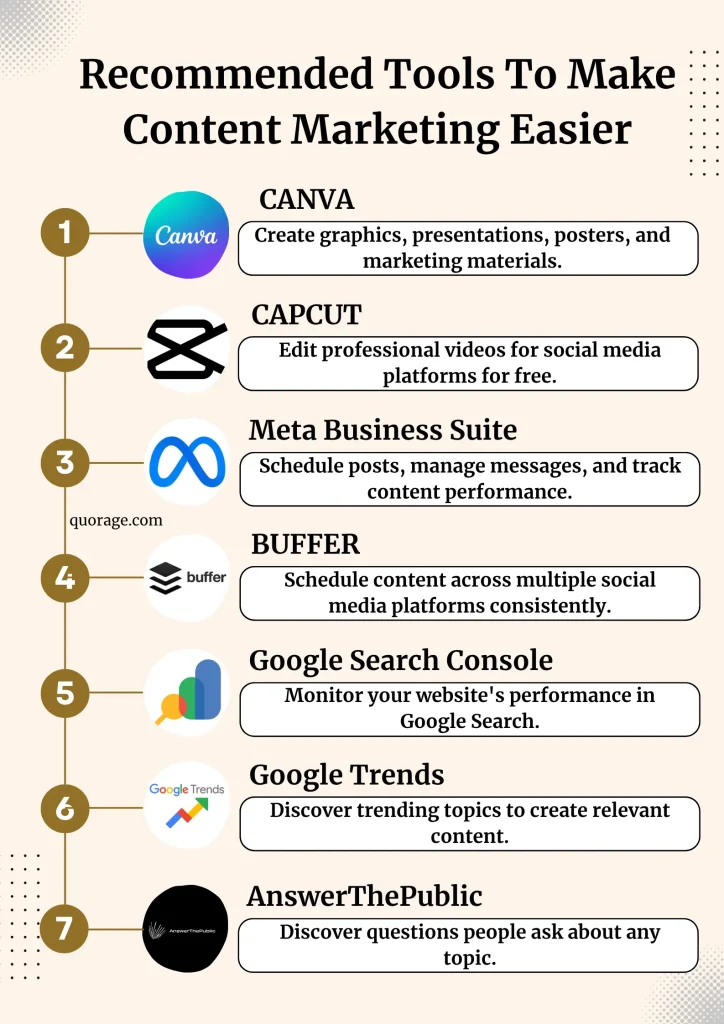
The right tools make content marketing easier, help you create professional-looking content, and measure whether your efforts are attracting customers. The following tools are beginner-friendly, affordable, and suitable for most small businesses.
Canva
Use Canva to create social media graphics, presentations, posters, and other marketing materials. The free version offers enough features to get started, while Canva Pro provides access to premium templates, stock photos, and brand management tools.
CapCut
CapCut is a free video editing tool that helps you create professional-looking videos for platforms such as TikTok, Instagram Reels, Facebook, and YouTube. You trim videos, add captions, transitions, music, and effects without requiring advanced editing skills.
Meta Business Suite
If you use Facebook and Instagram, Meta Business Suite allows you to schedule posts in advance, manage messages, and monitor the performance of your content from one place.
Buffer
Buffer lets you schedule content across multiple social media platforms, helping you maintain a consistent posting schedule without publishing everything manually.
Google Search Console
If you have a website, Google Search Console helps you monitor how your content performs in Google Search. It shows which search terms bring visitors to your website and identifies opportunities to improve your visibility.
Google Trends
Google Trends helps you discover topics your audience is actively searching for, making it easier to create timely and relevant content.
AnswerThePublic
AnswerThePublic shows the questions people ask online about a particular topic. You use these questions to create content that addresses your audience’s needs and attracts potential customers through search engines.
You do not need every tool listed above to succeed with content marketing. Start with free tools, focus on creating valuable content consistently, and invest in paid tools only when they help you save time or improve your results.
Estimated timeline to see results
The timeline for seeing results from content marketing depends on several factors, including your industry, the type of content you create, how consistently you publish, and how well your content addresses your audience’s needs. While every business is different, expect results to develop in stages.
Months 1 to 3: Build your foundation
During the first three months, focus on researching your audience, creating valuable content consistently, and experimenting with different content formats and platforms. At this stage, you begin noticing early signs of progress, such as increased engagement, website traffic, social media followers, and customer inquiries. Despite the limited sales, you are building the trust and visibility that will support future growth.
Months 3 to 6: Gain momentum
If you continue publishing valuable content consistently, you start reaching a wider audience and attracting people who are actively looking for the products or services you offer. Your content begins appearing in search results, generating more inquiries, leads, and sales as potential customers become familiar with your business.
Months 6 to 12: Establish a sustainable customer acquisition channel
By this stage, you will have built a library of content that continues attracting potential customers long after it is published. As your visibility and credibility grow, content marketing becomes a reliable source of leads and sales, allowing you to attract customers without relying heavily on paid advertising.
The businesses that achieve the best results treat content marketing as a long-term investment rather than a one-time campaign. By consistently creating valuable content and refining your strategy based on performance, you build a marketing asset that continues working for your business over time.
3. Turn one-time buyers into repeat customers with email marketing
Use email marketing to turn one-time buyers into repeat customers by building an email list, sending enticing and educational emails, and using automated, personalized emails to stay connected. By consistently providing useful information instead of only promotions, businesses can build trust, strengthen customer relationships, and encourage repeat purchases over time.
Email marketing is sending emails to people who have shown an interest in your business. These emails include helpful tips, new product announcements, special offers/discounts, or updates about your business. The goal is to stay connected with your customers even after they have made a purchase.
Pathpages (formerly Notionway) is a business that sells digital Notion templates. As the company grew, founder Modest Mitkus used email marketing to build stronger relationships with potential customers, automate communication, and create a more consistent sales process.
Pathpages case study
Pathpages realized that when their customers visited their website, they left without making a purchase. Others may bought once but never returned. Pathpages recognized that attracting visitors was only part of the challenge. The real opportunity was finding a way to stay connected with potential customers after they left the website and encouraging existing customers to continue buying new products.
The strategy Pathpages used
Pathpages built their email marketing strategy around attracting subscribers with valuable free resources and then nurturing them with automated, personalized email campaigns.
Step 1: Offer Valuable Free Resources
Pathpages created free Notion templates that people downloaded in exchange for their email address. These free resources encouraged people who were interested in Notion and productivity to join the company’s email list.
Step 2: Segment Subscribers Based on Their Interests
Rather than treating every subscriber the same, Pathpages organized its audience based on their interests and actions. For example, subscribers who showed interest in a particular type of Notion template received emails related to that topic, making the content more relevant to each individual.
Step 3: Automate the Customer Journey
Once someone joined the email list, automated email sequences delivered relevant content without requiring manual follow-up. These automated workflows helped introduce subscribers to the company’s products, provide additional value, and guide them through the customer journey.
Step 4: Continue Growing the Email List
Pathpages continued attracting new subscribers by promoting its free resources through multiple channels, including social media, blog content, SEO, Reddit, and other online communities where its target audience was active. Each channel directed interested people to a landing page where they could subscribe to the email list.
Pathpages grew its business to five-figure monthly sales with email marketing as a major part of its growth strategy. Automated email workflows allowed the business to consistently generate sales, while audience segmentation ensured subscribers received content based on their interests. The company also continued growing its email list through lead magnets and multiple acquisition channels, and regularly monitored campaign performance to refine its email strategy over time.
How to use email marketing to attract and retain customers
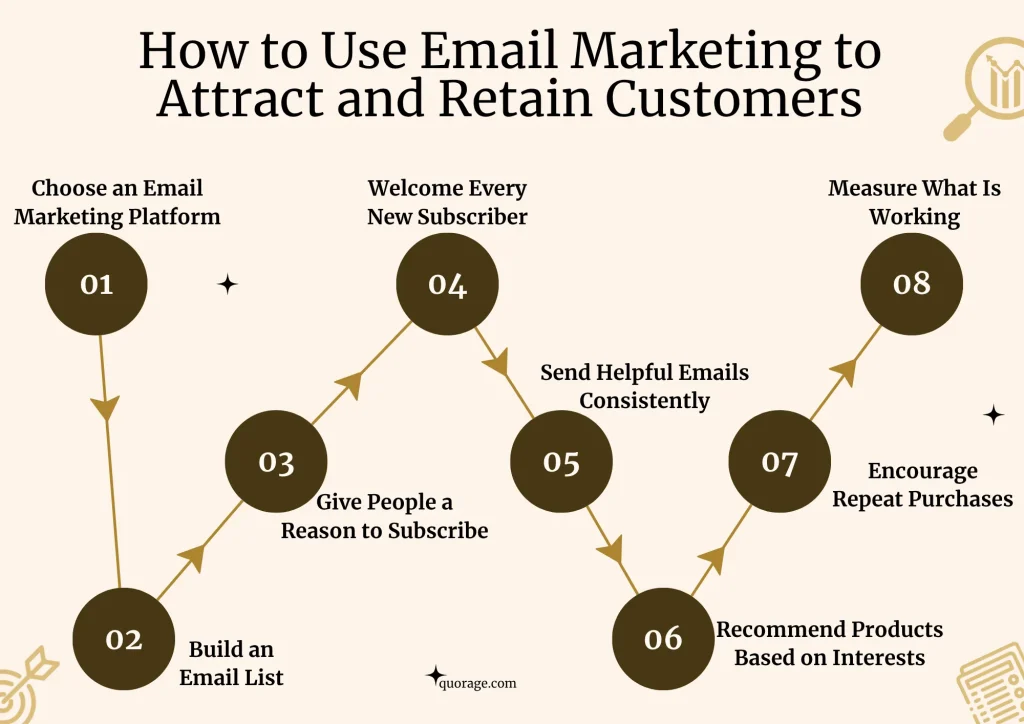
Start by collecting email addresses from people who are interested in your products, provide them with value, and stay in touch until they are ready to buy, or buy again.
Step 1: Choose an email marketing platform
The first step is to create an account with an email marketing platform like Kit (formerly ConvertKit) or MailerLite. The platform will store subscriber information, help create email campaigns, and automate emails to new subscribers.
Since the budget is limited, it is best to start with a free plan. Most email marketing platforms allow small businesses to manage a limited number of subscribers and send a set number of emails before requiring a paid subscription.
At this stage, only three things are needed:
- A subscriber list
- A simple email template
- A way to automate welcome emails
Step 2: Build an email list
Before sending emails, there must be people to send them to. Start by collecting email addresses from customers who are genuinely interested in the business.
Start by:
- Asking customers in-store if they would like to receive updates, offers, or tips
- Adding an email sign-up form to a website
- Sharing a sign-up link on WhatsApp Status, Instagram, Facebook, TikTok, and other platforms
- Including the sign-up link in social media bios
- Encouraging customers to subscribe during checkout or purchase
Always ask for permission before adding someone to the email list. This builds trust and ensures people actually want to receive emails.
Step 3: Give people a reason to subscribe
People are more likely to share their email address when they receive something valuable in return.
For example:
- A skincare routine guide
- A hair care checklist
- Tips for choosing the right beauty products
- A first-purchase discount
- Early access to new product launches
- Exclusive subscriber-only offers
This is known as a lead magnet. Pathpages used free Notion templates to attract subscribers. In the same way, useful or exclusive content can be used to encourage sign-ups.
Step 4: Welcome every new subscriber
The first email a subscriber receives is very important.
Instead of immediately selling, the first email should:
- Thank the subscriber for joining
- Explain what they can expect from future emails
- Deliver any promised free resource or discount
- Introduce best-selling products
- Invite them to follow on social media
This helps create a strong first impression and builds trust early.
Step 5: Send helpful emails consistently
Many businesses only send emails when they want to make a sale. A better approach is to provide consistent value.
Helpful emails help build trust and keep the business top of mind. These can include:
- Beauty tips and tutorials
- How to use products correctly
- Answers to common customer questions
- Customer reviews and testimonials
- New product announcements
- Limited-time offers
- Seasonal recommendations
One email every one to two weeks is enough for a small business managing its own marketing.
Step 6: Recommend products based on interests
Not all customers are interested in the same products.
As the email list grows, subscribers should be grouped based on their interests or purchase history.
For example, for customers interested in skincare, send skincare-related content, while those interested in hair care send hair-related recommendations.
Pathpages used subscriber interests to send more relevant emails. The same approach can be used to improve engagement and increase sales.
Step 7: Encourage repeat purchases
Email marketing is not only for attracting new customers but also for retaining existing ones.
It can be used to:
- Notify customers when products are back in stock
- Recommend complementary products
- Share exclusive discounts
- Announce new arrivals
- Send seasonal promotions
- Thank customers and encourage repeat purchases
Staying in touch with past customers is often more cost-effective than constantly finding new ones.
Step 8: Measure what is working
Email performance should be reviewed regularly.
Most email platforms provide analytics such as:
- Open rates
- Click-through rates
- Link activity
- Sales or website visits from emails
- Unsubscribe rates
Reviewing this data helps identify what type of emails perform best and allows continuous improvement over time.
Estimated time to see results
Email marketing is a long-term strategy that becomes more effective as your email list grows and you learn what resonates with your audience. While you set up the basics within a few days, building a list of engaged subscribers and turning them into loyal customers takes consistent effort.
Here is a table that will guide you on what to expect:
| Timeline | What to Focus On | Expected Results |
| Week 1 | Choose an email marketing platform, create a sign-up form, set up a welcome email, and start collecting email addresses from existing customers. | A functioning email marketing system ready to receive subscribers. |
| Weeks 2–4 | Continue collecting email addresses, send your first newsletter, and share your sign-up link on your social media platforms and website. | A small but growing email list and your first insights into how subscribers interact with your emails. |
| Months 2–3 | Send helpful emails consistently, refine your content based on analytics, and begin grouping subscribers based on their interests or purchase history. | Increased engagement, stronger relationships with subscribers, and the potential for repeat purchases from existing customers. |
| Months 4–6 | Continue growing your email list, improve your email campaigns using performance data, and maintain regular communication with subscribers. | A larger, more engaged audience, increased repeat purchases, and email becoming a reliable channel for attracting and retaining customers. |
Keep in mind that these timelines are estimates. The results you achieve will depend on factors such as how quickly you grow your email list, the value you provide through your emails, how consistently you communicate with subscribers, and how well your products meet your customers’ needs. Businesses that consistently collect new subscribers and send relevant, valuable emails are more likely to see stronger long-term results.
Recommended tools
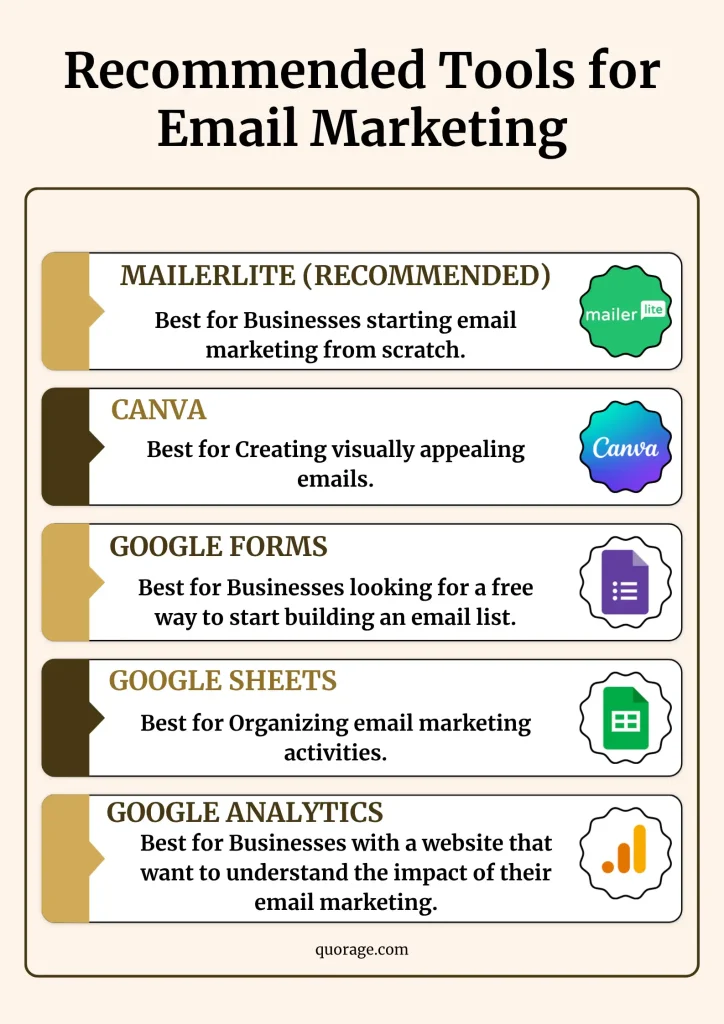
1. MailerLite (Recommended)
MailerLite is an email marketing platform. It’s an excellent starting point for small businesses because it combines email marketing, automation, landing pages, and sign-up forms in one platform. It was also the platform used by Pathpages in the case study, making it a practical choice for implementing a similar strategy.
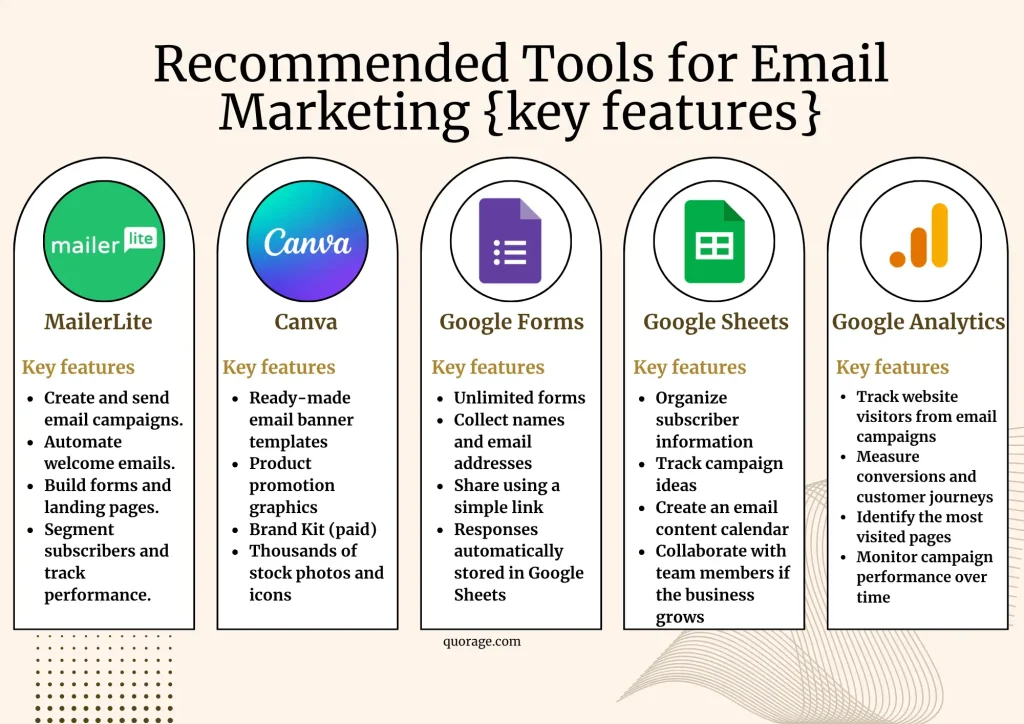
Key features
- Create and send email campaigns
- Build automated welcome emails
- Create sign-up forms and landing pages
- Segment subscribers based on interests or behavior
- View analytics such as open rates and click-through rates
Best for: Businesses starting email marketing from scratch.
Estimated cost
- Free: Suitable for getting started and growing your first email list.
- Paid: Starts from approximately US$10 per month (around KES 1,300), depending on the number of subscribers and features required.
2. Canva
Purpose: Designing email graphics
Canva makes it easy to create professional-looking banners, product images, promotional graphics, and branded visuals for emails without any design experience.
Key features
- Ready-made email banner templates
- Product promotion graphics
- Brand Kit (paid)
- Thousands of stock photos and icons
Best for: Creating visually appealing emails.
Estimated cost
- Free: More than enough for most small businesses.
- Canva Pro: Approximately US$6.5 per month (around KES 850).
3. Google Forms
Purpose: Collecting email subscribers
If you don’t yet have a website or landing page, Google Forms provides a simple way to collect names and email addresses. The form link can be shared through WhatsApp, Facebook, Instagram, TikTok, or QR codes displayed in-store.
Key features
- Unlimited forms
- Collect names and email addresses
- Share using a simple link
- Responses automatically stored in Google Sheets
Best for: Businesses looking for a free way to start building an email list.
Estimated cost
- Free
4. Google Sheets
Purpose: Managing subscribers and planning campaigns
Use Google Sheets to keep track of subscribers, record where they signed up, plan future email campaigns, and organise promotional calendars.
Key features
- Organize subscriber information
- Track campaign ideas
- Create an email content calendar
- Collaborate with team members if the business grows
Best for: Organizing email marketing activities.
Estimated cost
- Free
5. Google Analytics
Purpose: Measuring website traffic from email campaigns
If you have a website, Google Analytics helps you understand what subscribers do after clicking links in your emails. You can see which email campaigns drive the most traffic, how long visitors stay on your website, and which pages they visit before making a purchase.
Key features
- Track website visitors from email campaigns
- Measure conversions and customer journeys
- Identify the most visited pages
- Monitor campaign performance over time
Best for: Businesses with a website that want to understand the impact of their email marketing.
Estimated cost
- Free
What’s the best strategy to start with to attract more customers without paying ads?
Start with low-cost, high-impact strategies like opening a Google Business Profile account and social media accounts and collecting customer reviews, then gradually add content marketing and email marketing.
When working with a limited budget, focus on strategies that cost little or nothing to implement but still deliver meaningful results.
- First, create and optimize your Google Business Profile
A complete and well-optimized Google Business Profile helps customers find your business through Google Search and Google Maps at no cost. It also allows customers to call you, request directions, visit your website, and leave reviews.
Once your Google Business Profile is set up, begin asking satisfied customers to leave reviews and share testimonials. Positive reviews build trust, improve your local search visibility, and make it easier for potential customers to choose your business over competitors.
- Open social media accounts on every social media platform, research your audience, and start creating content
Once your business is easier to find through Local SEO, the next step is to open social media accounts and start creating content. Before you begin posting, spend time researching your target audience so you understand who they are, the questions they ask, and the type of content they enjoy. This will help you create content that attracts the right customers instead of posting randomly.
Content marketing comes after Local SEO because it takes longer to produce results. While Local SEO helps people find your business when they are actively searching for products or services like yours, content marketing helps you reach people who may not know your business yet. As you consistently publish helpful content, you build trust, grow your audience, and create more opportunities for potential customers to discover your business. Over time, this content continues working for you, attracting customers long after it has been published.
- Build an email list
As your customer base grows, start collecting email addresses with your customers’ permission. Use email marketing to share useful tips, introduce new products, announce promotions, and encourage repeat purchases. This strategy becomes increasingly valuable as your business grows.
These three strategies work best when they build on one another. Local SEO helps customers find your business, content marketing helps them get to know and trust your brand, and email marketing helps turn interested customers into loyal, repeat buyers.
The table below compares each strategy so you can understand when to use it and what to expect.
| Strategy | Estimated Cost (monthly) | Difficulty | Time to See Results | Best Suited For |
| Google Business Profile & Local SEO | Free | Easy | 1 to 3 months | Local businesses with a physical location or service area |
| Content Marketing | Free – KES 150,000 | Medium | 3 to 6 months | Businesses that want to build trust and attract customers through creating content |
| Email Marketing | Free – KSh 10,000 | Medium | 1 to 3 months | Businesses with existing customers who want to encourage repeat purchases |
Your 90-day customer acquisition plan
For the first month, create a strong online foundation by improving your local visibility, establishing trust, and planning your marketing. The second month shifts to attracting customers through consistent content, email marketing, and customer engagement. The final month is dedicated to measuring results, refining what works, building partnerships, and creating a repeatable marketing system that continues to bring in new customers and encourage repeat business.
Use this 90-day plan as your checklist.
Month 1: Build your foundation
The first month focuses on making it easy for customers to find your business and trust it.
Your goals
- Create or claim your Google Business Profile.
- Complete every section of the Google Business Profile, including your business description, categories, contact information, business hours, products or services, and high-quality photos.
- Ensure your business name, address, and phone number (NAP) are consistent across all online directories.
- Ask at least 10 customers to leave Google reviews.
- Collect customer email addresses with their permission.
- Create your social media pages if you haven’t already.
- Research your target audience and identify the platforms where they spend the most time.
- Develop your content pillars and create a simple content calendar for the following month.
By the end of Month 1, your business should have a professional online presence, begin appearing in local search results, and start building trust through customer reviews and consistent business information.
Month 2: Attract more customers
Now that your foundation is in place, focus on attracting new customers through creating content and sending emails to customers.
Your goals
- Publish at least two to three pieces of helpful content each week on the social media platforms your ideal customer frequents and during the hours they are online.
- Share educational posts, customer testimonials, behind-the-scenes content, and product demonstrations.
- Start sending a simple monthly email newsletter to your subscribers.
- Continue asking customers for reviews after every successful sale or service.
- Monitor which content receives the most engagement and identify what your audience enjoys most.
By the end of Month 2, more people should be discovering your business through Google and social media. You should also begin building stronger relationships with existing customers, increasing the chances of repeat purchases.
Month 3: Grow and improve
The final month focuses on improving your marketing efforts using the data you’ve collected.
Your goals
- Review your Google Business Profile Insights and website analytics.
- Identify your best-performing social media posts and create more of that content.
- Continue publishing valuable content consistently.
- Set up a welcome email for new subscribers if you haven’t already.
- Create promotional emails highlighting your most popular products or services.
- Reach out to at least two complementary businesses to explore partnership opportunities.
- Review customer feedback and make improvements based on common suggestions or complaints.
- Set marketing goals for the next three months based on your results.
By the end of Month 3, your business should have a stronger online presence, more customer reviews, a growing email list, improved customer relationships, and a consistent marketing system that continues to attract and retain customers.
Your 90-day checklist
| Month | Main Focus | Key Activities |
| Month 1 | Build Your Foundation | Google Business Profile, Local SEO, customer reviews, audience research, content planning. |
| Month 2 | Attract More Customers | Content marketing, email newsletter, referrals, WhatsApp updates, collecting more reviews. |
| Month 3 | Grow and Improve | Analytics, email automation, partnerships, community engagement, improving your marketing based on results. |
